
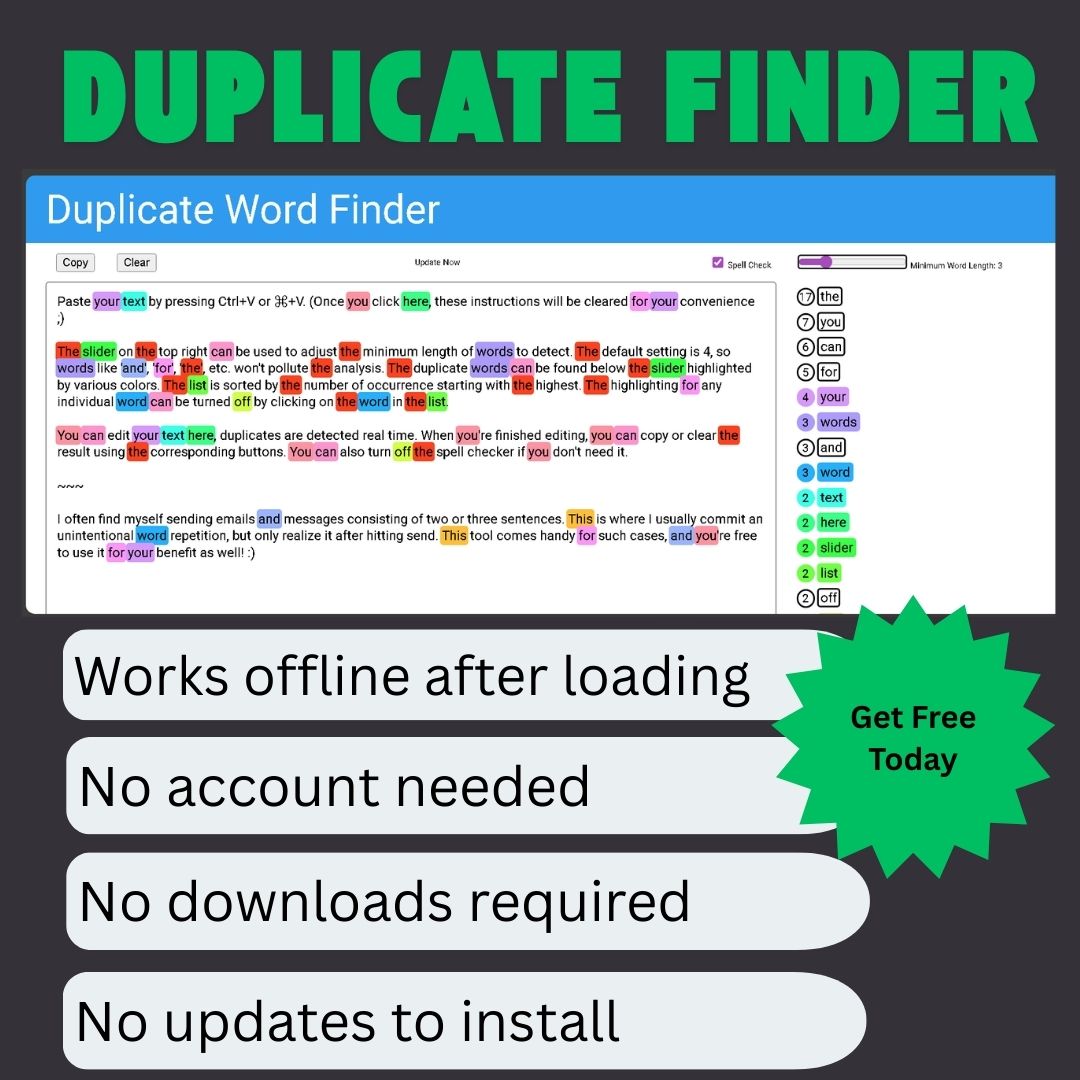


Duplicate Word Finder
🎯 What It Does
The Duplicate Word Finder helps you quickly identify repeated words in your text. It highlights duplicate words and common spelling errors, making it easy to spot areas that need improvement in your writing.
🔧 How It Works
1. Input Your Text
-
Paste or type your text into the main text area
-
The tool analyzes text in real-time as you type
2. View Highlights
-
Duplicate Words appear in different colors based on frequency:
-
🔴 Red = Very frequent duplicates (appear 5+ times)
-
🟡 Yellow = Frequent duplicates (appear 3-4 times)
-
🔵 Blue = Moderate duplicates (appear 2 times)
-
-
Spelling Errors appear with a wavy red underline
3. Adjust Settings
Sidebar Controls:
-
Number Filter: Increase or decrease the minimum number of letters a word must have to be checked
-
Slide right: Check longer words only (5+ letters)
-
Slide left: Check all words (2+ letters)
-
-
Common Words: Toggle to ignore common words like “the”, “and”, “is”
-
Case Sensitive: Choose whether to treat “Word” and “word” as the same
📊 Color Key
| Color | Meaning | Example |
|---|---|---|
| Red Highlight | Word appears 5+ times | “important” appears 6 times |
| Yellow Highlight | Word appears 3-4 times | “analysis” appears 3 times |
| Blue Highlight | Word appears 2 times | “result” appears 2 times |
| Wavy Red Underline | Possible spelling error | “recieve” (should be “receive”) |
💡 Best Uses
Perfect For:
-
Bloggers & Writers: Reduce word repetition in articles
-
Students: Improve essay quality by avoiding repeated words
-
Email Writers: Polish professional communications
-
Content Creators: Ensure clean, varied vocabulary
-
Non-native Speakers: Catch overused words and spelling mistakes
Quick Tips:
-
Start with minimum word length set to 4
-
Keep “ignore common words” turned ON
-
Click on highlighted words to see how many times they appear
-
Use the color coding to prioritize which duplicates to fix first
⚡ Key Features
Simple & Fast
-
No sign-up required
-
Instant results
-
Clean, distraction-free interface
-
Works completely in your browser
Smart Detection
-
Intelligent word filtering
-
Context-aware highlighting
-
Real-time updates
-
Case-insensitive matching
Privacy First
-
Your text never leaves your device
-
No data collection
-
No cookies required
-
100% private processing
📱 How to Use
Step-by-Step:
-
Paste your text into the box
-
Adjust the word length slider in the sidebar
-
Scan the highlighted text
-
Replace repeated words as needed
-
Review spelling suggestions
Recommended Settings:
-
For general writing: Word length = 4, ignore common words = ON
-
For technical writing: Word length = 3, ignore common words = OFF
-
For quick proofreading: Word length = 5, ignore common words = ON
🎨 Visual Guide
Input Text: "The project was very successful.
The team completed the project on time."

Highlights:
- "The" (common word, not highlighted if filter is ON)
- "project" 🔵 (appears 2 times, blue highlight)
- "the" (common word, not highlighted)
🔄 Workflow Example
Before:
“The analysis shows clear results. The analysis indicates positive outcomes.”
After Using Tool:
-
“analysis” appears 2 times (blue highlight)
-
Replace second “analysis” with “study”
-
Result: “The analysis shows clear results. The study indicates positive outcomes.”
📈 Benefits
Immediate Improvements:
-
✅ Cleaner Writing: Reduce word repetition
-
✅ Better Flow: More varied vocabulary
-
✅ Professional Tone: Avoid amateur writing patterns
-
✅ Time Saver: Instant spotting of issues
-
✅ Learning Tool: Understand your writing habits
Long-term Value:
-
Develop better writing habits
-
Improve vocabulary usage
-
Create more engaging content
-
Build professional writing skills
🎯 Ideal For These Scenarios:
Academic Writing
-
Check essays and research papers
-
Ensure varied vocabulary
-
Maintain formal tone
Business Communication
-
Polish reports and proposals
-
Improve email clarity
-
Professional document preparation
Creative Writing
-
Avoid repetitive descriptions
-
Enhance narrative flow
-
Create vivid, varied prose
Web Content
-
SEO-friendly writing
-
Engaging blog posts
-
Clear, concise articles
💬 Quick Start
-
Copy your text from any document
-
Paste it into the tool
-
Watch as duplicates highlight automatically
-
Adjust the sidebar slider to focus on specific word lengths
-
Make changes directly in the text box
⚙️ Technical Details
What Counts as a Duplicate?
-
Same word, same form (no stemming)
-
Case-insensitive by default
-
Ignored if in common words list (optional)
-
Minimum length configurable (2-10 letters)
What Counts as Spelling Error?
-
Words not in standard English dictionary
-
Minimum 3 letters long
-
Excludes proper nouns and technical terms
📋 Limitations
What It Won’t Do:
-
✘ Check grammar or punctuation
-
✘ Suggest synonyms automatically
-
✘ Analyze sentence structure
-
✘ Check for plagiarism
-
✘ Save your documents
What It Excels At:
-
✓ Finding repeated words
-
✓ Basic spelling checks
-
✓ Simple, focused analysis
-
✓ Quick proofreading
-
✓ Privacy protection
🆓 Free & Unlimited
No Restrictions:
-
Unlimited text length
-
Unlimited usage
-
No daily limits
-
No feature locks
-
No watermarks
Always Available:
-
Works offline after loading
-
No account needed
-
No downloads required
-
No updates to install
🎓 Learning Resources
Common Issues to Watch For:
-
Overused Adjectives: “very”, “really”, “extremely”
-
Repeated Nouns: Key terms used too frequently
-
Common Verbs: “is”, “has”, “does” (if filter is off)
-
Transition Words: “however”, “therefore”, “furthermore”
Quick Fixes:
-
Use synonyms for repeated words
-
Rephrase sentences
-
Combine similar ideas
-
Vary sentence structure
📞 Get Started Now
It’s Simple:
-
Visit the tool
-
Paste your text
-
See duplicates highlighted
-
Make improvements
-
Copy your cleaned text
No learning curve. No sign-up. Just paste and go.




Reviews
There are no reviews yet